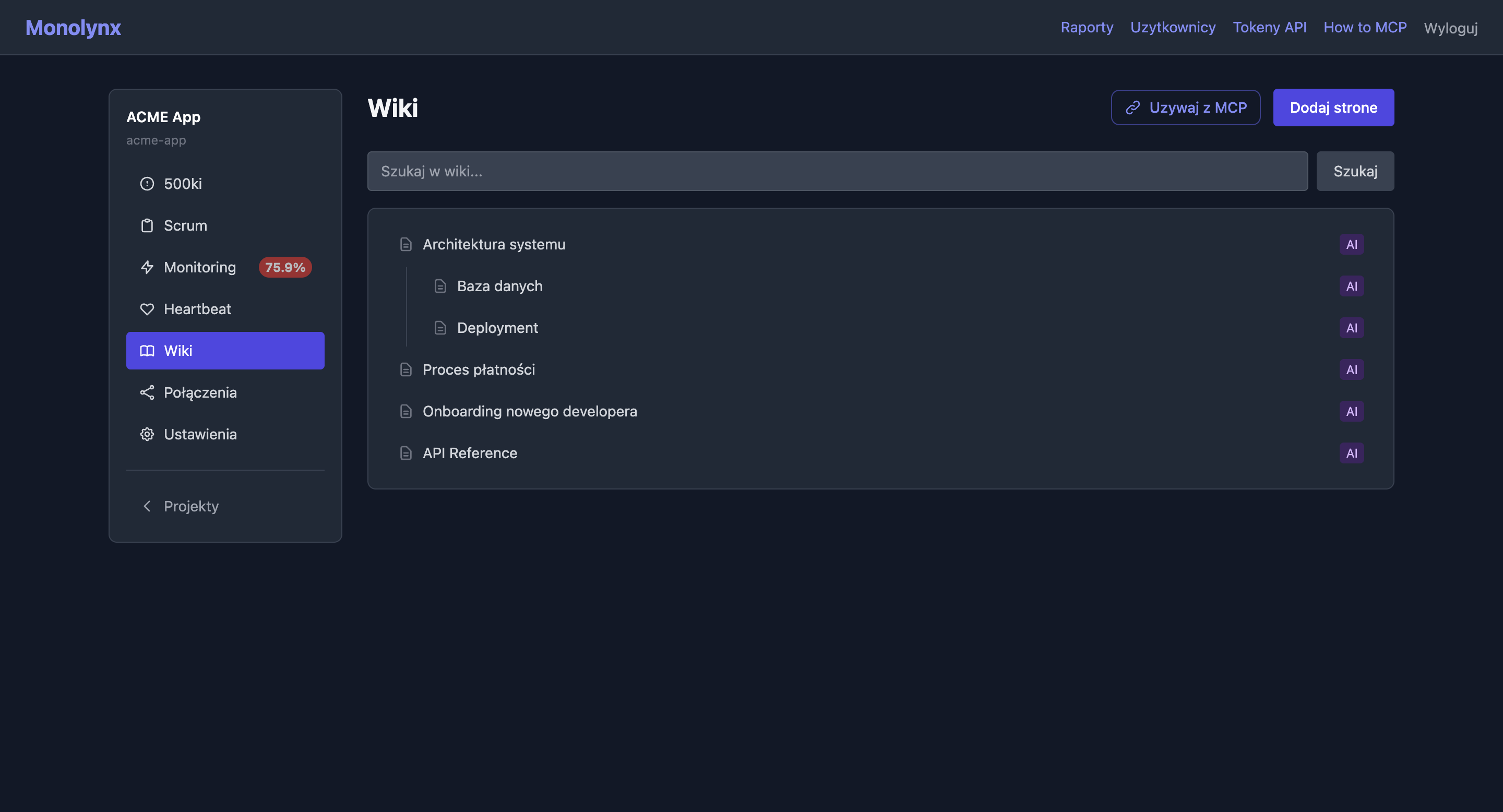
Hierarchical Markdown pages with a WYSIWYG editor, image uploads to MinIO, and semantic search via pgvector + OpenAI embeddings. A wiki designed for humans and AI agents alike.
Page tree with parent/child relationships. Breadcrumbs for navigation. Child pages displayed on parent page.
Markdown with live preview, formatting, and drag & drop image insertion. Dark theme matching the UI.
Images stored in object storage (MinIO). Path: {slug}/attachments/{filename}. Served directly.
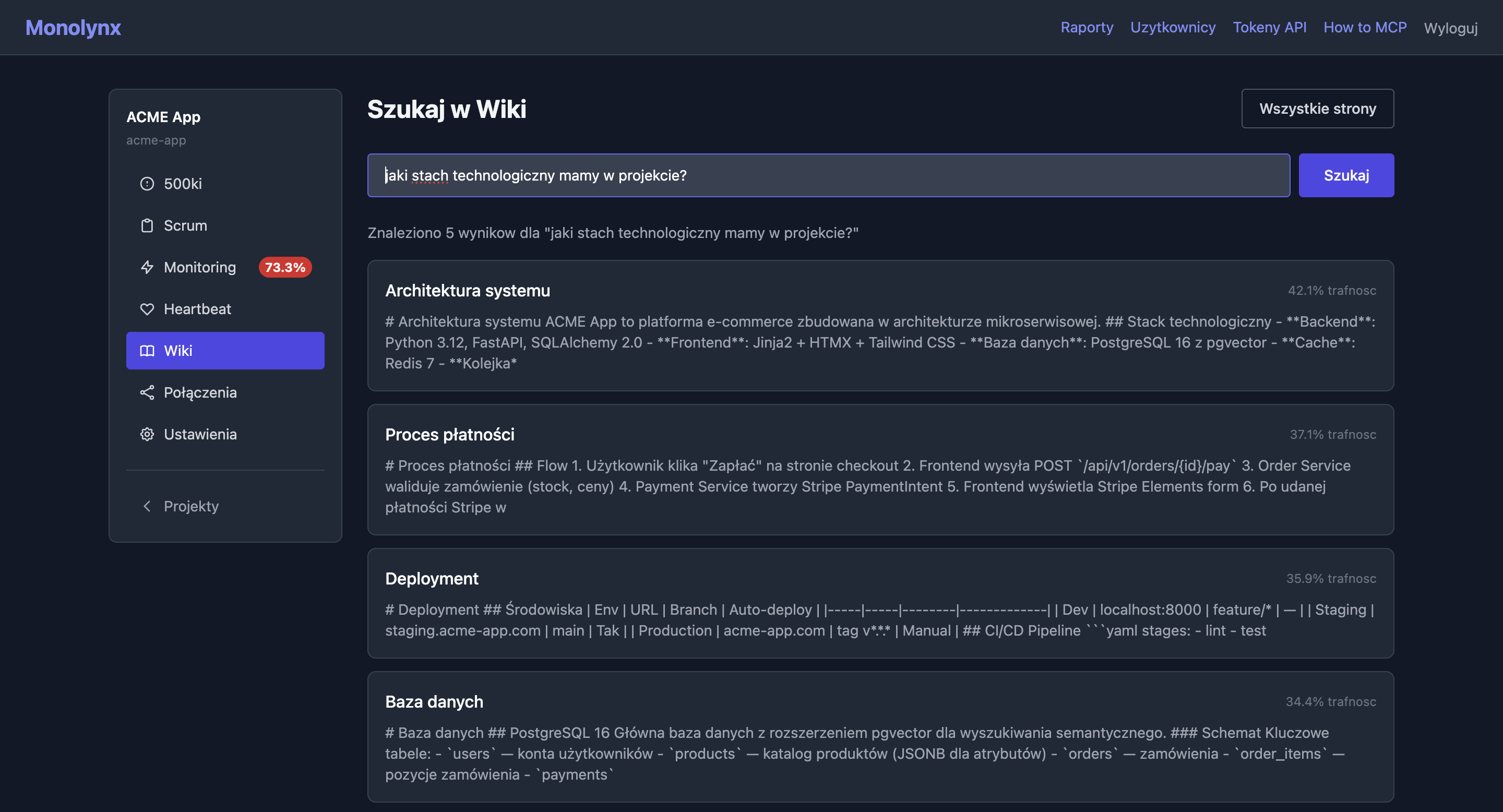
pgvector with HNSW index + OpenAI text-embedding-3-small. Ask in natural language — system finds best matching fragments.
Pages split into ~500 token chunks with overlap. Tokenization via tiktoken. Each chunk has its own embedding.
Who created the page, who last edited. Full change transparency.
No OpenAI key? Wiki works normally — semantic search is simply disabled.
render_markdown_html() with Tailwind prose prose-invert. Same renderer used in Scrum tickets and comments.
A "public page" checkbox on the wiki form exposes content without login at /blog/{slug}. Only an account with the blog permission, granted by a superuser, can change it; other accounts see the state read-only. Page attachments (images, PDFs) are served safely — MIME allow-list for inline (PNG/JPEG/GIF/WebP), everything else as attachment with an X-Content-Type-Options: nosniff header.
A post's URL does not change when the page title changes, and a previous URL redirects (301) to the current one. The /blog/ list orders posts by publication date, so editing an older post does not reshuffle it. The list teaser and the meta description come from the post description, or from a content summary when there is none.
You write a post in plain markdown and the page gets ready-made blocks: callouts (note, tip, warning) and TL;DR, a quote with its author, an image with a caption, code with a file name and a copy button, heading anchors and footnotes. The server generates the block HTML and sanitizes the author's content, so custom scripts, classes and ids never reach the page.
A few lines of markdown give a post an accordion FAQ, steps, statistics, a comparison table with a highlighted column, a collapsible section, a gallery, a CTA button and a glossary. YouTube and Vimeo videos load only after a click, so the page sends no request to the video service before that. From the FAQ, steps and videos the server prepares structured data for search engines and AI models.
A markdown table becomes a bar, line or pie chart that the server draws as SVG, a description with Mermaid code becomes a diagram, and a console block becomes a terminal window with a typing animation. Animated schematics come from a closed list of components kept in the repository, so a post never contains scripts or styles. The source of every graphic is text: an AI model reading the markdown version and a reader with JS turned off get the data, the description or the code. Charts and schematics work in the light and the dark theme, and animations turn off when the system asks for reduced motion.
A post has a header with tags, author, dates, reading time and cover, plus a table of contents built from H2-H3 headings that highlights the current section (from 3 headings up). Below the content are links to the other language versions and up to 3 related posts in the same language. The /blog/ list filters by tag and language (?tag=, ?lang=), and pagination keeps the filters.
The blog has Atom, RSS and JSON Feed feeds with the full content of the 20 newest posts, and readers find them in the page head. The /llms.txt file lists the newest posts live with markdown addresses, and /llms-full.txt holds all public blog content in one document. Post translations are linked in the sitemap, and AI crawlers (GPTBot, ClaudeBot, PerplexityBot and others) may read the blog in robots.txt without getting into the dashboard, the API or MCP.
The lint checks a post before it is published: a description of 50-300 characters, a TL;DR block with 2-5 points at the top, image alt text, the content of graphic blocks, heading order, descriptive link texts, the verified date and the translation. The result is a list of problems with a line number and a level (error, warning, info) and a score from 0 to 100. The lint_blog_post MCP tool, the REST API and the monolynx blog lint command return the same result.
Publishing a post is a separate operation: the lint runs first, then the page goes public at /blog/{slug}. A post with lint errors stays private and the refusal names the rules to fix; the force parameter publishes anyway. Unpublishing takes the post and its markdown version offline (404), while the publication date and the slug stay, so publishing again restores the same address. The publish_blog_post and unpublish_blog_post MCP tools, the REST API and the monolynx blog publish and monolynx blog unpublish commands do it. Publishing, unpublishing and changing the metadata need the blog permission on the user account: only a superuser grants it, and a role in the project, the owner's included, is not enough.
A "Blog post" section on the page edit form sets the address (slug), a description with a character counter, the author, tags, language, the link to a translation, a cover picked from the page attachments and the verified date. A validation error shows a message and keeps the values you typed, and a regular wiki page with an empty section does not become a post. Only an account with the blog permission sees the section.
A "Post preview" button on the wiki page opens the draft in the look of the public blog, with blocks, the table of contents and reading time, before you tick "public page". Only a signed-in user with wiki read permission sees the preview, and its address carries a noindex header and never appears in the sitemap, the feeds or /llms.txt.
The /monolynx:blog-post skill takes a post from the brief through the outline, the draft and the lint to the preview, and publishes only after your explicit consent; in a background session it ends at the draft. The public guide /blog-authoring.md describes the block syntax, the lint rules and the connector operations, so a model without the plugin can write a post in this format too.
An "Insert block" menu in the editor toolbar inserts a ready syntax template of every post block at the cursor, and the list of blocks comes from the registry on the server. An image uploaded in the editor becomes a page attachment and, once the post is published, shows to a reader without login.
E.g., "System Architecture". Use the EasyMDE editor to write in Markdown.
Create children, e.g., "Database Design" under "Architecture". Tree builds automatically.
Drag images into the editor — they auto-upload to MinIO and insert as Markdown.
Type a question in the search field — system finds best matching page fragments based on meaning, not just keywords.
Your AI agent can read any page and search semantically — as if it were a team member.
Wiki is the heart of Monolynx's AI-first approach. Your AI agent searches documentation, manages attachments and project files - 13 MCP tools.
Available MCP tools
list_wiki_pages
Full hierarchy tree with parent_id and depth
get_wiki_page
Page content + breadcrumbs for navigation
create_wiki_page
New page with optional parent_id (child page)
update_wiki_page
Edit content, title, position
delete_wiki_page
Cascading delete (page + children)
search_wiki
Semantic RAG search (if embeddings are active)
add_wiki_page_attachment
Add attachment to wiki page (base64)
list_wiki_page_attachments
List wiki page attachment metadata (no content)
get_wiki_attachment
Get wiki page attachment content (base64)
add_wiki_file
Add global file to wiki repository
get_wiki_file
Get global file content (base64)
update_wiki_file
Update file description or name
list_wiki_files
List global files in wiki repository
Error tracking
Agile project management
URL health checks
Cron job monitoring
Dependency graph
Work analytics & PDF export
Cross-project billing & attachments
Personal cross-project scheduling
AI agent work observability
Work from the terminal
Public blog readable by people and AI